30% of your revenue happens while you sleep
Founders don’t buy software during business hours, they buy software when it’s most convenient for them. That often happens after hours at 9 pm, 12 am, or even
A customer can be perfectly happy with your product and still churn because their renewal payment failed. Maybe their card expired, the bank declined the charge, or there simply weren’t enough funds available. If nobody catches the failure, that revenue can disappear.
Dunning management is the process of recovering failed payments through automated retries, customer communication, and escalation. The term also applies to collecting overdue invoices, but for subscription businesses, it’s an important defense against involuntary churn.
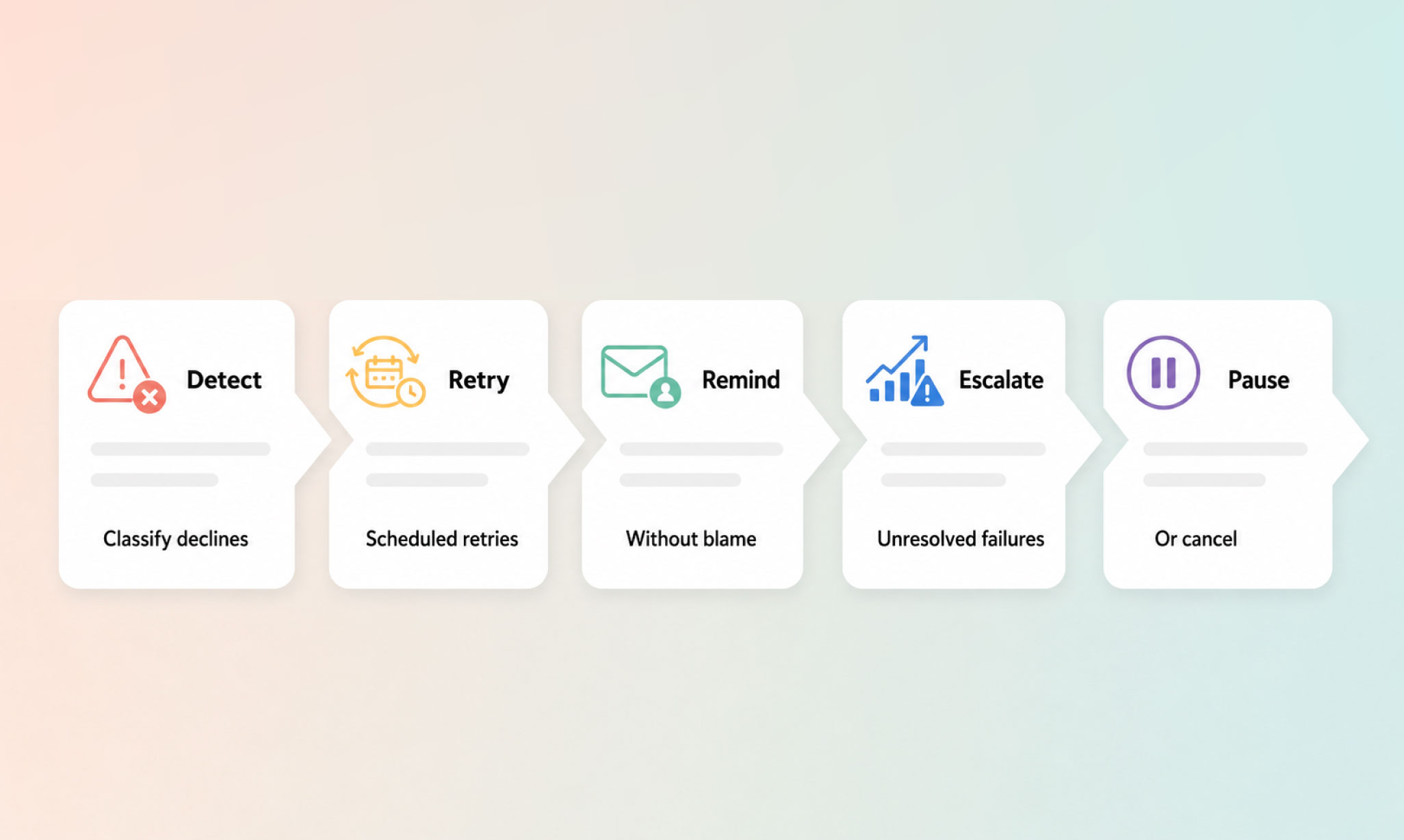
Below, we’ll break down the process into five stages and look at how to prevent some payment failures from happening at all.
The first job of dunning management is to work out what actually went wrong. A failed payment doesn’t always mean there’s a problem with the customer’s card, and it certainly doesn’t mean they’ve decided to stop paying.
Payment failures generally fall into two groups: soft declines and hard declines.
A soft decline is a temporary failure. The customer may not have enough money available when the charge is attempted, or there may be a network error or timeout between payment systems. The payment method can still be valid, which means trying the charge again later may be enough to recover the revenue. Salesbricks classifies these failures as eligible for an automatic retry.
A hard decline needs customer action. An expired card, incorrect card number, or a card reported lost or stolen isn’t going to start working because you try it again three days later. Salesbricks doesn’t automatically retry these payments. Instead, it emails the customer and directs them to the customer portal to update their payment method.
Knowing the difference matters. Treat every decline as a reason to contact the customer, and you create unnecessary friction over failures that might have been resolved without them doing anything.
So before the emails and escalation begin, classify the failure. Soft decline? Retry it. Hard decline? Ask the customer to fix the payment method.
Once a payment has been classified as a soft decline, the next step is to retry it. The trick is not to keep running the same charge over and over.
Salesbricks automatically retries soft declines on days 3, 7, and 14 after the most recent failed payment. This gives temporary problems, such as insufficient funds or a payment provider timeout, time to clear before another attempt is made.
This is the basic idea behind smart retry logic: retry failures that have a reasonable chance of succeeding, and don’t waste retries on those that don’t. That's a job for customer contact, not another retry.
If a retry succeeds, the recovery process stops there. If the payment keeps failing, the account moves further into the dunning process.
If a hard decline needs customer action, or automatic retries haven’t recovered the payment, it’s time to get the customer involved.
The email shouldn’t read like a collections letter. They may simply have an expired card or payment details that need updating.
Keep the message practical. Tell the customer which payment failed, the amount due, why it failed, where that information is available, and what they need to do next. A direct link to update their payment method removes another unnecessary step.
This is also a poor place to rely on someone checking invoices manually. Payment emails should go out automatically when they’re needed, with a customer portal where payment details can be updated.
Salesbricks automates payment communications and gives customers a portal for managing their payment methods. The aim is to tell the customer what happened, give them a quick way to fix it, and avoid turning a routine payment failure into a frustrating collections experience.
If the retry cycle ends without a successful payment, or a customer hasn’t responded to a hard decline, the process moves from recovery to escalation.
Typically, that means giving the customer a final opportunity to pay before changing their access. A final notice should make the deadline and next step clear. From there, a business might restrict the account (for example, moving it to read-only access) rather than immediately canceling the subscription.
For SaaS businesses, these actions can be tied directly to payment status. Salesbricks supports invoice.payment.failed and invoice.payment.succeeded webhooks, which teams can use to trigger downstream actions when an invoice fails or is recovered.
Escalation can also reveal a wider billing problem. If more customers than usual are reaching this stage, check whether something earlier in the process is going wrong. Incorrect billing details, invoices that don’t match the agreed deal terms, or other setup errors can all create payment problems that dunning alone won’t solve.
The goal at this stage is to protect revenue without turning a payment problem into an unnecessary cancellation.
A failed payment doesn’t have to end with a canceled subscription. If there’s still a reasonable chance of recovering the customer, pausing the account first gives them time to resolve the problem without immediately ending the relationship.
A typical pause period might last 14 to 30 days. During that time, access can be restricted while the customer’s account and subscription data are retained. For higher-value or more complex accounts, an automated sequence may not be the right approach at all. Salesbricks allows automatic retries to be disabled for individual orders, so the team can handle those customers directly.
Cancellation should come later. Common practice is to cancel when the customer asks to leave, there are signs of fraud, or the account remains unpaid after a longer pause period (commonly 60 to 90 days). These are general operating thresholds rather than Salesbricks-specific settings.
A pause-first approach gives recoverable payment failures more time to be resolved. That’s how good dunning reduces involuntary churn: it prevents a temporary billing problem from automatically becoming a lost customer.
Pre-dunning is the practice of contacting customers beforehand when you already know there’s a risk of a problem.
Card expiration is the clearest example. If a customer’s card is due to expire, sending a reminder 7 to 30 days in advance gives them time to update their payment details before the next charge. That’s better for everyone than waiting for the renewal to fail and starting the recovery process afterward.
There’s also a broader prevention problem for B2B SaaS. Some billing issues begin when the terms agreed during the sale don’t make it cleanly into the billing system. Pricing, billing schedules, payment terms, and subscription details can end up spread across contracts, spreadsheets, CRM records, and payment tools.
That’s where unifying quote-to-cash can help. Keeping quoting and billing in the same system reduces the manual handoffs that can create discrepancies between what was sold and what gets billed.
Pre-dunning won’t eliminate every failed payment, so it should run alongside the recovery process rather than replace it. The aim is simply to prevent the failures you can, then have a clear process for the ones you can’t.
You don’t need to rebuild your entire billing process to improve dunning. Start by looking at your failed payments. How many are failing, why are they failing, and are you treating soft and hard declines differently?
You may be retrying cards that need customer action, contacting customers too early, or simply letting failed payments sit unnoticed.
From there, build the five stages into a repeatable process: classify the failure, retry what can be recovered, contact the customer when action is needed, escalate unresolved payments, and pause before you cancel.
The cleaner approach is to make dunning part of the same system that handles the deal and the billing in the first place. That way, payment recovery isn’t another workflow your team has to piece together after something goes wrong.
Book a demo with Salesbricks to see how dunning works inside one system for SaaS quoting and billing.