Renewal Risk in Usage-Based SaaS: Early Warning Signs
Usage-based SaaS renewals fail quietly, through falling consumption and smaller commitments. Learn the signs to watch and how to act early.
Selling through partners is one of the fastest ways to reach customers you'd never find on your own. Resellers, MSPs, and agencies already have the relationships. They bundle your product with their own services, and they pay you so their clients don't have to.
The catch shows up in billing. One subscription now involves two companies: the end customer who uses the product, and the partner who pays for it. Most billing tools assume those are the same company. So partner deals drift into spreadsheets, invoices land in the wrong inbox, and the partner can't tell what it owes.
This guide covers how partner billing works, how referral partners and resellers differ, who pays tax, what goes on a partner statement, and how partners can pay dozens of invoices without chasing each one.
Partner billing (also called reseller billing or indirect billing) is when a SaaS vendor invoices a partner for a subscription that another company, the end customer, uses. The partner pays the vendor, then bills its own client on its own terms.
Partner billing isn't the same as paying partners a revenue share or commission, where money flows from you to the partner. It also isn't third-party billing, where an outside company runs your invoicing for a fee. In partner billing, the partner is the one paying you.
It shows up under several names, depending on the industry:
Whatever the name, the billing problem is the same. Two companies are involved in one subscription: one uses the product, and the other pays for it. Most billing tools assume those are the same company.
A referral partner introduces the customer, and the customer still pays you. A reseller pays you on the customer's behalf. That one difference decides who gets the invoice, whose card is charged, and whose details drive tax.
| Billing detail | Referral partner | Reseller (billed partner) |
|---|---|---|
| Who uses the product | End customer | End customer |
| Who receives the invoice | End customer | Partner's accounts payable team |
| Who pays | End customer | Partner |
| Whose payment method is charged | End customer's | Partner's |
| Tax and tax ID based on | End customer | Partner (the billed company) |
| Who owes you if an invoice goes unpaid | End customer | Partner |
| What the partner needs from you | Visibility into the customers it referred, and its commission | Invoices, a statement of what it owes, and a way to pay |
Many vendors have both kinds of partner, sometimes on the same deal. Your billing system should let you choose who is billed each time a partner is added to a subscription, rather than fixing it for the partner as a whole.
The end customer is the customer of the product, and the partner is the customer of the invoice. Keep both on the record, and never let one company's details overwrite the other's.
In practice, that means tracking three things separately:
The common failure is a single "customer" record doing both jobs. The partner's address ends up on the end customer's account, or the end customer receives invoices it was never meant to pay. Both create disputes that take weeks to untangle.
The invoice is usually taxed based on the company being billed, so when a reseller pays, its address and tax ID are what matter. The exact rules depend on the jurisdiction and on whether the reseller is buying for resale, so confirm your setup with a tax advisor.
Whatever your rules, your billing system should get three things right:
This guide isn't tax advice. It describes how billing software should keep the data straight, so your tax engine gets the right inputs.
A partner deal is quoted like any other deal, but the order form has to name both companies and say clearly which one pays. Settle that at signing, so finance never has to work it out from emails after the deal closes.
A partner order form should include:
Two safeguards prevent most problems later. First, partner details should come from the partner's record and be read-only on the order form, so nobody retypes them per deal. Second, the person filling in the order form shouldn't be able to rename the partner or change its billing details from inside one deal.
This is the hand-off where separate tools break. If quoting, signing, and billing live in different systems, the "who pays" decision has to be re-entered by hand in each one, and partner deals are where it goes wrong most often. Billing automation only helps if that decision travels with the deal.
Usage is measured on the end customer's account, but the usage invoice goes to the partner. The partner then has to bill the same usage on to its client, so every usage invoice needs to show clearly which customer and which period it covers.
Usage-based billing makes partner billing harder in three ways:
Consider an example. An AI API company sells through an MSP that manages 8 end customers. Each customer has a monthly platform fee plus metered usage. That makes 16 invoices a month, or 192 a year, all paid by one AP team. Without per-customer service periods and a combined view, the MSP can't check its bill against what it charges its own clients.
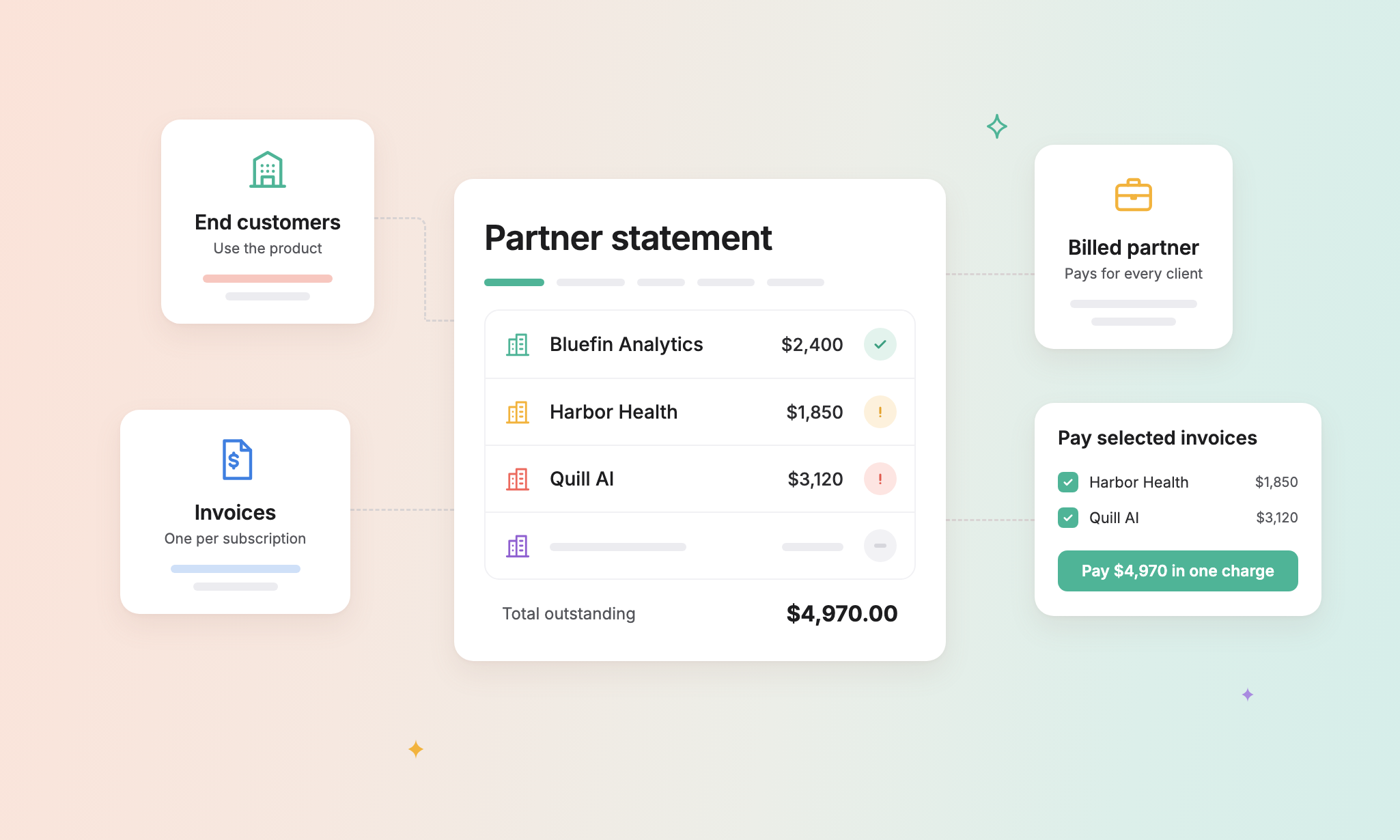
A partner statement is a single, consolidated document that lists every invoice billed to a partner in a period, paid and unpaid, with the total billed and the total still outstanding. It is the partner's equivalent of a bank statement, and it is what its finance team reconciles against.
A good partner statement includes:
Sample statement (hypothetical figures):
| End customer | Invoice | Service period | Status | Total | Amount due |
|---|---|---|---|---|---|
| Bluefin Analytics | INV-1042 | Sep 2026 | Paid | $2,400.00 | $0.00 |
| Harbor Health | INV-1047 | Sep 2026 | Outstanding | $1,850.00 | $1,850.00 |
| Quill AI | INV-1051 | Aug 2026 | Past due | $3,120.00 | $3,120.00 |
| Total | $7,370.00 | $4,970.00 |
Choosing the period. Monthly and quarterly statements suit most partners. An all-time statement, covering every invoice from a start date onward, is the quickest way to catch old unpaid invoices that a monthly view would miss. You also need to decide which date places an invoice in a period: the issue date, or the start or end of its service period.
Keep each version. If an invoice is paid after you send a statement, regenerate it as a new version rather than editing the old one. Then you can always show exactly what the partner was sent, and when.
Give partners three things: a secure portal for their payment methods, auto-pay they agree to once, and a way to pay many invoices in one payment. Paying 16 invoices a month one by one is how a good partner turns into a past-due one.
Behind a single charge, each invoice should still get its own payment record. That keeps every invoice's status correct, and lets you refund one invoice without unwinding the rest.
Two rules avoid surprises. Turning auto-pay on should apply to new charges only, never sweeping up older invoices that were skipped. And invoices already paid, voided, or in progress should show $0 due and never be charged twice.
In your accounting system, the partner is the customer who owes the money, and each end customer sits beneath it as a sub-customer. That way the partner's balance is correct and you can still see receivables per end customer.
In QuickBooks Online, that looks like this:
If you record partner invoices against the end customer instead, aging reports show the wrong company as owing you. If you record them only against the partner, you can't answer "how much does this end customer's account bring in?"
Billing software is ready for partners if it can keep two companies apart on one subscription, from the quote to the payment. Use these questions when you evaluate a tool:
Salesbricks is a quote-to-cash platform for B2B SaaS companies, including those with usage-based pricing. Quoting, contracts, subscriptions, billing, and payments all run in one system. So who pays is decided once, at signing, and carried through to every invoice, statement, and payment.
For partner deals, Salesbricks gives revenue and finance teams:
Because partner billing runs in the same system as quoting, nobody has to re-enter the partner's details after a deal closes. The order form, the invoice, and the statement all draw on one partner record.
Coming soon: partner pricing (a standard discount or wholesale price per partner), referral commission tracking and payouts, and credit limits per partner.
In practice, none. Both describe a SaaS vendor invoicing a partner instead of the end customer who uses the product. "Reseller billing" is the more common term when the partner marks up the price and bills its own client.
No. Revenue sharing, sometimes called partner payouts or self-billing, is money you pay a partner for bringing you a customer. Partner billing is money a partner pays you for a customer's subscription. Many vendors do both, and each needs its own records.
The end customer uses the product and owns the subscription. The reseller is the billed party: its details go on the invoice, and it owes the money.
Yes, and that's the usual setup. The partner gets one invoice per end customer subscription, plus one consolidated statement that lists them all and can be paid in a single charge.
They get one consolidated statement. It lists every invoice across all their end customers, with the total outstanding, and they can pay the whole balance in a single charge. Each end customer's charges stay on their own invoice underneath, so tax, refunds, and revenue reporting stay accurate per customer.
A partner statement lists every invoice billed to a partner in a period, paid and unpaid, with the total billed and the total outstanding. Partners use it to reconcile what they owe.
Yes, if your billing system supports it. The partner pays everything on a statement, or a selection of invoices, in one charge, and each invoice records its own share of the payment.
By the partner, because it's the partner's card or bank account that gets charged. One end customer paying by card should never turn on auto-pay for a partner's other invoices.
Record the partner as the parent customer and each end customer as a sub-customer that bills with its parent. The partner's balance stays correct, and you still see receivables per end customer.
Partners bring you customers you'd never reach alone, but only if working with you is easy. That comes down to billing: keep the end customer and the partner apart on every order form and invoice, send the partner a statement it can reconcile, and let it pay many invoices at once. Get that right, and partner deals stop being the exception your finance team dreads.
Want to see partner billing in action? Book a Salesbricks demo.